1. Home
  2. Thermotrack Webserve
  3. Hardware installation
  4. FoxNet Dataloggers intallation
  5. How do I assign a fixed IP address to a Sensor Net Connect or Controller FoxNet?
  1. Home
  2. Thermotrack Webserve
  3. Hardware installation
  4. Installation with Sensor Net Connect
  5. How do I assign a fixed IP address to a Sensor Net Connect or Controller FoxNet?

How do I assign a fixed IP address to a Sensor Net Connect or Controller FoxNet?

To set a fixed IP address for a FoxNet Sensor Net Connect or Controller, follow the instructions below

  1. Connect the Sensor Net Connect or Controller to your PC using the USB cable supplied.
  2. Search for the device in the list of devices connected like a USB stick
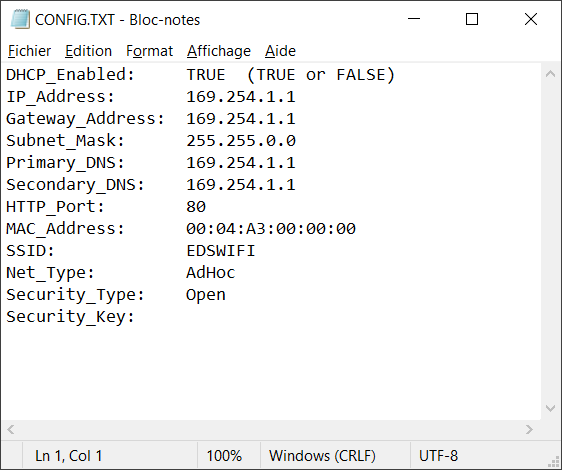
  3. Open the “Config.txt” file
  4. configuration snc wifi
  5. Change DHCP_Enabled list to “False
  6. Modify IP addresses
  7. Save the file
  8. Connect the device to your network
Updated on 16/04/2026
Was this article helpful?

Related Articles

Leave a Comment