
Open the Ivy (remove the rear cover with your fingernails)
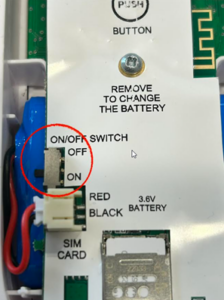
Switch on the Ivy by turning the button to ON
The red and green LEDs will flash alternately while the Ivy searches for the NB-IoT network
When the Ivy has found the network, the green LED will remain lit for 5 seconds
Tip: To make it easier to discover the network, place the IVY near a window.
Go to www.thermotrack-webserve.com
Log in with the username and password you received from service@thermotrack-webserve.com
Check your spam folder if you cannot find this email.
Your Ivy are already registered on your account. Set the alarm thresholds and message recipients.

